

21 Aug CSS Tutorial
CSS simplifies the design of web pages to make them look more amazing. CSS is referred to as Cascading Style Sheets (CSS) and is widely used to work for enhancing the look and feel of a website or web pages.
CSS has the potential of handling the design of all the web pages at once. It defines the layout of your web pages so that the styling looks great on multiple devices also.
We will be working on CSS 3, which extended the features defined in CSS2, preserving backward compatibility.
Popularity
CSS is currently being used by 98% of all websites as a site element for designing. Initially released in the year 1996 as CSS 1, it is now being worked with websites as CSS 3, the enhanced version of CSS 1 and CSS 2.
CSS 3 i.e. CSS Level 3 is divided into several separate documents called modules.
Viewers
The tutorial is prepared for students, engineers, and professionals. Beginning with the overview, you will learn how to add CSS for website designing, understand the Box Model, working with text properties, borders, images, links, etc. With that, step-by-step lessons are provided covering basic as well as advanced CSS 3 concepts.
Why CSS
When Cascading Style Sheets (CSS) wasn’t introduced, developers only had HTML to work on websites. All the presentation attributes were part of the HTML markup. The font, font colors, text color, background color, borders, etc were explicitly added. For every web page, the information was added again. Well, this repetition led to more complex and larger documents.
CSS was introduced, and the work became easier since only a single file needed to be changed to change the complete layout of a website. The information is moved to a style sheet, which leads to simpler HTML.
Getting started with CSS
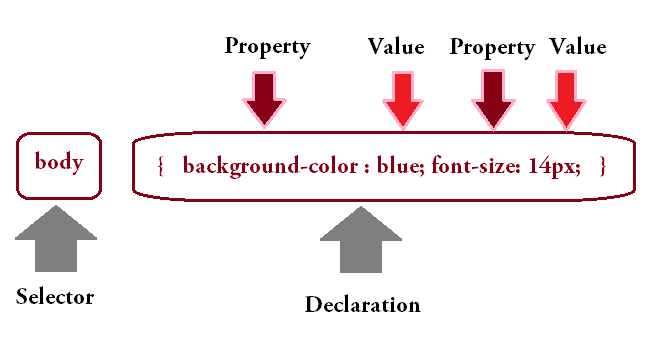
While beginning with CSS, you should be aware of selectors as well as declarations. The declaration includes property and values. The following is an example to showcase the working of CSS, which adds a background color and font size, and lets you know how to begin CSS learning:
FAQs
Q1: What is CSS and why is it used in web development?
Ans: CSS (Cascading Style Sheets) is a stylesheet language used to describe the presentation, layout, and visual design of web pages written in HTML. While HTML provides the structural skeleton of a web page, CSS controls colors, fonts, spacing, alignments, positioning, animations, and responsive layouts across different screen sizes.
Q2: What are the three ways to insert CSS into an HTML document?
Ans: CSS can be applied to HTML in three ways:
- Inline CSS: Applied directly to an HTML tag using the style attribute (e.g., <h1 style=”color: blue;”>).
- Internal (Embedded) CSS: Placed inside a <style> tag within the <head> section of an HTML page.
- External CSS: Written in a separate .css file and linked to HTML documents using the <link> tag in the <head> section (the recommended best practice for reusability and maintainability).
Q3: What is the CSS Box Model and what are its core components?
Ans: The CSS Box Model is a foundational design concept that wraps every HTML element in a rectangular container. From the inside out, its four components are:
- Content: The actual text, image, or media contained within the element.
- Padding: Transparent space surrounding the content inside the element’s border.
- Border: A solid, dashed, or decorative line surrounding the padding.
- Margin: Transparent space outside the border that separates the element from surrounding elements.
Q4: What is the difference between CSS Flexbox and CSS Grid Layout?
Ans: Both are modern layout systems in CSS, but they target different dimensional structures:
- CSS Flexbox (Flexible Box Layout): Designed for one-dimensional layouts (either a single row OR a single column), making it ideal for aligning items inside navigation bars, buttons, or linear card stacks.
- CSS Grid Layout: Designed for two-dimensional layouts (rows AND columns simultaneously), making it ideal for overall page layouts, complex photo galleries, and multi-column magazine structures.
Q5: What core styling and layout concepts are covered in Studyopedia’s CSS tutorial?
Ans: Studyopedia’s CSS tutorial covers CSS syntax, selectors (element, class, ID, attribute), color models (HEX, RGB, HSL), typography, the Box Model, background properties, display properties (block, inline, inline-block, none), positioning (static, relative, absolute, fixed, sticky), CSS Flexbox, CSS Grid, media queries for responsive web design, and CSS transitions/animations.
CSS Index
The following lessons are covered in the CSS Tutorial,
CSS – Basics
CSS – Advanced
CSS – Flexbox
CSS – Grids
CSS – Resources
Let’s start with CSS Introduction.

No Comments