


21 Dec Pandas Tutorial
Pandas is a powerful and easy-to-use open-source tool built on top of the Python programming language. It is useful for data analysis and manipulation. Python with Pandas is widely used in Statistics, Finance, Neuroscience, Economics, Web Analytics, Advertising, etc.
To work with data sets, clean them, and make them relevant for Data Science is what Pandas do. With that, easily load and read data sets in Excel, CSV, JSON, XML, etc. formats with Pandas and work on them. Easily clean the wrong format data, remove duplicates, and do other tasks with Pandas.
Python Pandas Tutorial (English)
Refer to our complete Pandas Video Course in the English language:
Python Pandas Tutorial (Hindi)
Refer to our complete Pandas Video Course in the Hindi language:
Popularity
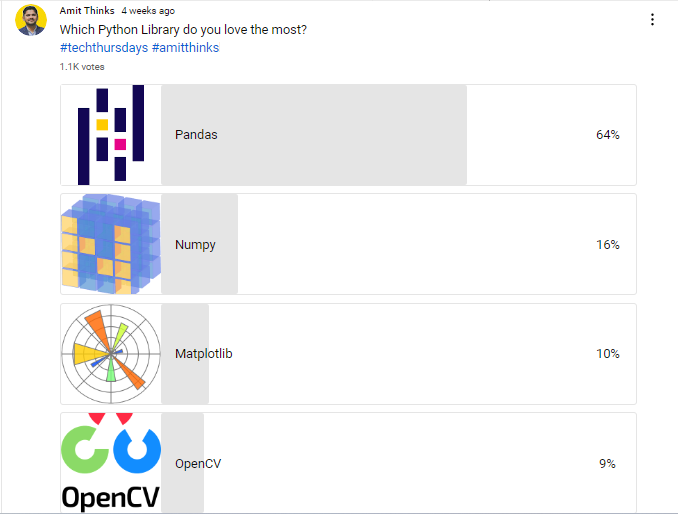
We posted a survey under our YouTube Channel Amit Thinks Community section to see which Python Library is popular and which users love the most. Out of 1.1k users, over 64% considered Pandas as the best choice:
FAQs
Q1: What is Pandas and why is it used in Python?
Ans: Pandas is an open-source Python library built on top of NumPy, specifically designed for data manipulation, cleaning, and analysis. It provides fast, flexible, and expressive data structures- primarily DataFrames and Series—that allow developers and data scientists to easily load, filter, transform, and aggregate structured tabular data from formats like CSV, Excel, and SQL databases.
Q2: What is the difference between a Pandas Series and a Pandas DataFrame?
Ans: The primary difference lies in their dimensionality:
- Pandas Series: A one-dimensional labeled array capable of holding data of any single type (integers, strings, floating-point numbers, etc.). Think of it as a single column in a spreadsheet.
- Pandas DataFrame: A two-dimensional, size-mutable, tabular data structure with labeled axes (rows and columns). Think of it as a complete spreadsheet table or SQL database table made up of multiple Series.
Q3: What is the difference between .loc[] and .iloc[] in Pandas?
Ans: Both are used for selecting rows and columns from a DataFrame, but they index differently:
- .loc[] (Label-Based Indexing): Selects data using explicit row and column labels or boolean arrays (e.g., df.loc[0, ‘Age’] or df.loc[df[‘Age’] > 25]).
- .iloc[] (Integer Position-Based Indexing): Selects data using integer index positions starting from 0, regardless of the explicit labels (e.g., df.iloc[0, 2]).
Q4: How do you handle missing or null data in Pandas?
Ans: Pandas offers several built-in methods to detect, clean, and impute missing data (represented as NaN or None):
- isna() / isnull(): Checks for missing values in a Series or DataFrame.
- dropna(): Drops rows or columns that contain missing values.
- fillna(): Replaces missing values with a specific constant, mean, median, or forward/backward fills.
- replace(): Replaces specific values or placeholders across the dataset.
Q5: What core concepts and data manipulation techniques are covered in Studyopedia’s Pandas tutorial?
Ans: Studyopedia’s Pandas tutorial covers installation and setup, Series and DataFrame creation, reading/writing files (CSV, Excel, JSON), row/column selection, indexing and slicing (loc/iloc), filtering, handling missing data (fillna/dropna), string manipulation, grouping and aggregations (groupby), merging/joining datasets, sorting, and calculating summary statistics (describe, mean, value_counts).
Python Pandas Tutorial Index
Pandas – DataFrame
Pandas – Series
Pandas – Categorical
Pandas – Read CSV, Excel
Pandas – Indexing & Selecting
Pandas – Data Manipulation
Pandas – Data Cleaning
Pandas – Operations
Pandas – Plotting
If you liked the tutorial, spread the word and share the link and our website Studyopedia with others.
For Videos, Join Our YouTube Channel: Join Now

No Comments