

11 Jun Android Tutorial
Android is an open-source and Linux-based Operating System, widely used. Being a mobile OS, it is used for developing apps for tablets, television i.e., Android TV, as well as wearable devices like an Android Smartwatch. Here, you will learn how to develop Android apps easily.
Popularity
Android is the most-used OS, with the largest market share of 45% (April 2024 – Apr 2025), according to StatCounter, which provides Global Stats.
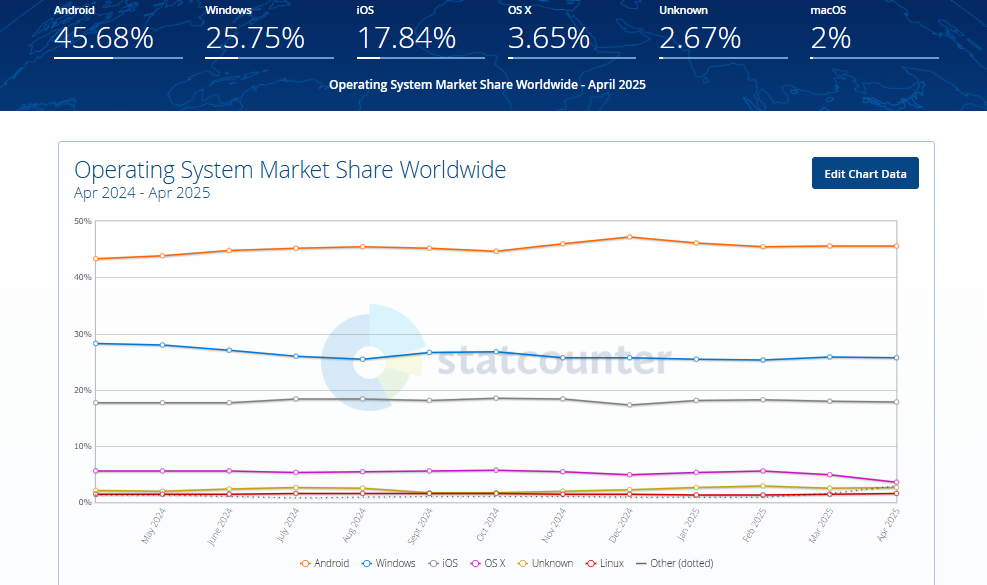
Source: StatCounter Global Stats – OS Market Share
Viewers
In this tutorial, you will learn about Android and how to develop apps easily with Android. Android is an open-source mobile OS. The Android app development tutorial is prepared for students, engineers, and professionals. Beginning with the introduction, you will learn how to set up an environment for Android and start working with it to develop amazing apps.
With that, step-by-step lessons are provided covering topics which will help you prepare basic to advanced-level apps.
FAQs
Q1: What is Android and what programming languages are used for Android app development?
Ans: Android is an open-source, Linux-based operating system developed by Google for mobile devices such as smartphones, tablets, smartwatches, and TVs. The primary programming languages used for building Android apps are Kotlin (Google’s preferred modern language) and Java. Additionally, C++ can be used via the Android NDK for performance-critical components.
Q2: What is Android Studio and why is it recommended for developers?
Ans: Android Studio is the official Integrated Development Environment (IDE) for Android app development, created by Google and JetBrains. It is recommended because it provides a complete suite of developer tools, including an advanced code editor, intelligent code completion, a visual layout editor, a built-in Android Emulator, real-time performance profilers, and seamless integration with Gradle build systems.
Q3: What are the core components of an Android application?
Ans: Android applications are built using four fundamental component types:
- Activities: Represent a single screen with a user interface (UI) that users interact with.
- Services: Background components that run long-running operations without requiring a user interface (e.g., playing music or fetching data).
- Broadcast Receivers: Listen for and respond to system-wide broadcast announcements (e.g., low battery alerts or network connectivity changes).
- Content Providers: Manages and shares application data securely across different apps (e.g., accessing contacts or media files).
Q4: What is the AndroidManifest.xml file and why is it essential?
Ans: The AndroidManifest.xml file is an essential control file located at the root of every Android app project. It serves as a blueprint for the Android OS, declaring critical app metadata including the app’s package name, components (Activities, Services, Receivers), hardware features required, minimum and target Android SDK versions, and runtime permissions (such as camera, internet, or location access).
Q5: What core concepts and development topics are covered in Studyopedia’s Android tutorial?
Ans: Studyopedia’s Android tutorial covers environment setup (installing Android Studio, SDKs, and setting up emulators), project structure, Activity lifecycle, UI layout design using XML and ConstraintLayout, handling user input, managing Intents for screen navigation, database integration with SQLite/Room, and building basic Android apps step-by-step.
Android Index
Installation
- How to install Android Studio 4 on Windows 10
- Run the Android app on a hardware device
- Android Project Directory
- Understanding Gradle
- First Android Program
Layouts
UI Controls
Resources
Let’s begin with Android Introduction
If you liked the tutorial, spread the word and share the link and our website Studyopedia with others.
For Videos, Join Our YouTube Channel: Join Now

No Comments