

31 Mar CSS Pseudo-elements
CSS pseudo-elements let you style specific parts of an element, such as the first letter, first line, or add generated content before/after elements. They are written with a double colon (::) and are distinct from pseudo-classes (which use a single colon).
Let us see the commonly used pseudo-elements in CSS:
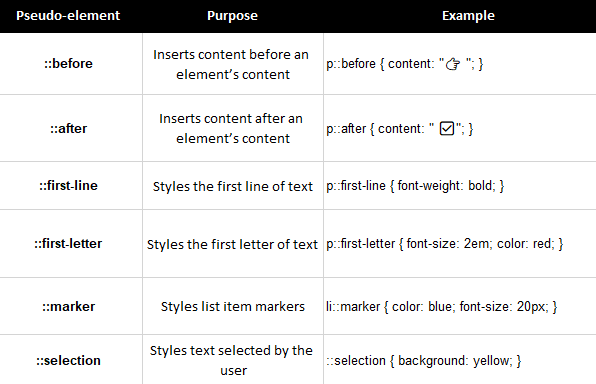
Let us understand them one by one with examples.
CSS ::before pseudo element
The ::before pseudo element inserts content before an element’s content.
Let us see an example to insert content before the p element content using the ::before pseudo element:
<!DOCTYPE html>
<html>
<head>
<style>
p::before {
  content: "Tutorial - ";
}
</style>
</head>
<body>
<h1>Demo Heading</h1>
<p>Java Programming for Beginners</p>
<p>Generative AI for Senior Developers</p>
<p>Bootstrap for Beginner Web Designers</p>
</body>
</html>
Output

CSS ::after pseudo element
The ::after pseudo element inserts content after an element’s content.
Let us see an example to insert content after the p element content using the ::after pseudo element:
<!DOCTYPE html>
<html>
<head>
<style>
p::after {
  content: " - 10% Off";
}
</style>
</head>
<body>
<h1>Products</h1>
<p>MySQL Book</p>
<p>MongoDB Guide</p>
<p>SQL Complete Guide</p>
</body>
</html>
Output

CSS ::first-line pseudo element
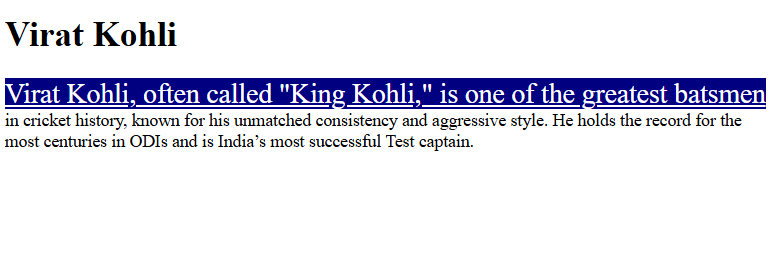
The ::first-line pseudo element styles the first line of text.
Let us see an example to style the first line of a <p> element using the ::first-line pseudo element:
<!DOCTYPE html>
<html>
<head>
<style>
p::first-line {
  background-color: navy;
  color: white;
  text-decoration: underline;
  font-size: 25px;
}
</style>
</head>
<body>
<h1>Virat Kohli</h1>
<p>Virat Kohli, often called "King Kohli," is one of the greatest batsmen in cricket history, known for his unmatched consistency and aggressive style. He holds the record for the most centuries in ODIs and is India’s most successful Test captain.</p>
</body>
</html>
Output
CSS ::first-letter pseudo element
The ::first-letter pseudo element styles the first letter of text.
Let us see an example. Here, the 1st letter of the h2 element will get styled using the ::first-letter pseudo element:
<!DOCTYPE html>
<html>
<head>
<style>
h2::first-letter {
  font-size: 30px;;
  color: orange;
}
</style>
</head>
<body>
<h1>IPL 2026 Popular Teams</h1>
<h2>Royal Challengers Banglore</h2>
<h2>Chennai Super Kings</h2>
<h2>Mumbai Indians</h2>
</body>
</html>
Output

CSS ::marker pseudo element
The ::marker pseudo element styles list item markers.
Let us see an example. Here, we have styled the <li> using ::marker:
<!DOCTYPE html>
<html>
<head>
<style>
::marker {
  font-size: 18px;
  color: blue;
}
</style>
</head>
<body>
<h1>Trending Technologies</h1>
<h2>Programming</h2>
<ul>
  <li>Python</li>
  <li>Java</li>
</ul>
<h2>Web Development</h2>
<ol>
  <li>PHP</li>
  <li>JavaScript</li>
</ol>
</body>
</html>
Output

CSS ::selection pseudo element
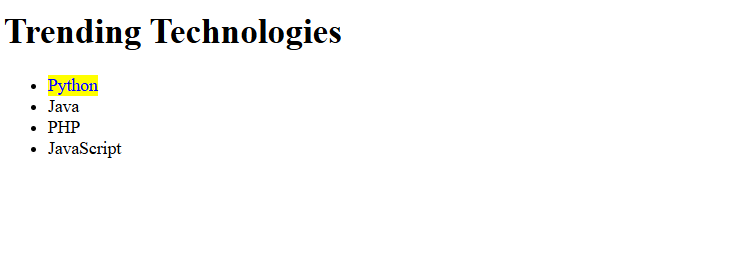
The ::selection pseudo element styles text selected by the user.
Let us see an example. Select any text, and see the difference.
<!DOCTYPE html>
<html>
<head>
<style>
::selection {
  color: blue;
  background: yellow;
}
</style>
</head>
<body>
<h1>Trending Technologies</h1>
<ul>
  <li>Python</li>
  <li>Java</li>
  <li>PHP</li>
  <li>JavaScript</li>
</ul>
</body>
</html>
Output
If you liked the tutorial, spread the word and share the link and our website, Studyopedia, with others.
Read More:

No Comments