

13 Jul StringBuffer class in Java
StringBuffer in Java is used to create modifiable strings, i.e., it doesn’t have a fixed length like the String class in Java. The StringBuffer class has growable and writable character sequences. It is thread-safe, i.e., multiple threads cannot simultaneously access the same method.
Video Tutorial (English)
Video Tutorial (Hindi)
Let us see how to create a string using StringBuffer:
StringBuffer strBuff = new StringBuffer("dwa");
StringBuffer class Constructors
The constructors of StringBuffer are displayed below:

StringBuffer class Methods
The methods of StringBuffer are displayed below with a description:
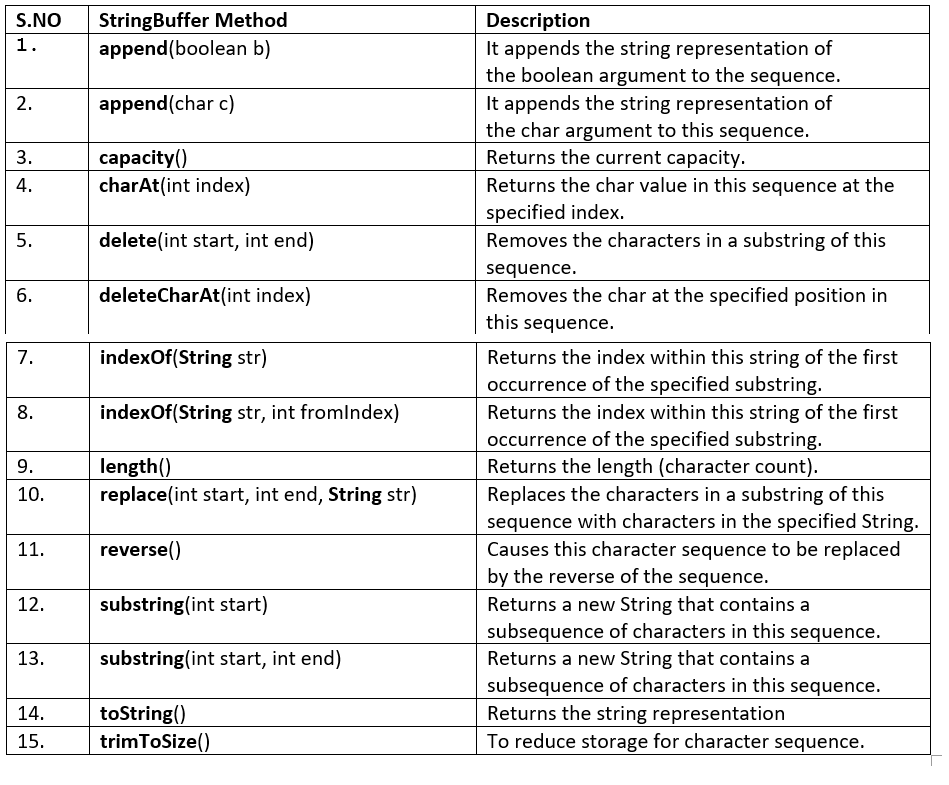
For complete reference of the StringBuffer methods, refer to the Oracle Java StringBuffer docs.
StringBuffer Examples
The following are some of the examples of StringBuffer:
Append the string representation in StringBuffer
The append() method in Java appends the string representation. Here, append(char ch) appends the string representation of the char argument to this sequence.
// Append the string representation with StringBuffer

class Demo66 {
    static void main(String[] args) {

        StringBuffer message = new StringBuffer("ABCD");
        System.out.println(message);

        // append
        message.append('E');

        System.out.println("The updated string = "+message);
    }
}
Output
ABCD
The updated string = ABCDE
Find the current capacity of a string in a StringBuffer
To fetch the current capacity, the capacity() method is used in Java:
import java.lang.*;

public class StudyopediaDemo {

   public static void main(String[] args) {

      StringBuffer strBuff = new StringBuffer("Dwa");
      System.out.println("StringBuffer = " + strBuff);

      // capacity will be 16 + 3
      System.out.println("capacity = " + strBuff.capacity());

      // append
      strBuff.append('y');

      System.out.println("Updated = " + strBuff);
     }
}
The output is as follows:
StringBuffer = Dwa
capacity = 19
Updated = Dway
Reverse the value of the StringBuffer object
To reverse the value of the StringBuffer object, the reverse() method in Java is used. Let us see an example:
import java.lang.*;

public class StudyopediaDemo {

   public static void main(String[] args) {

      StringBuffer strBuff = new StringBuffer("Dwa");
      System.out.println("StringBuffer = " + strBuff);

      // capacity will be 16 + 3
      System.out.println("capacity = " + strBuff.capacity());

      // append
      strBuff.append('y');

      System.out.println("Updated = " + strBuff);

      // append
      strBuff.append('n');

      System.out.println("Updated = " + strBuff);

      // append
      strBuff.append('e');

      System.out.println("Final StringBuffer = " + strBuff);

      System.out.println("Final StringBuffer (Reverse)= " + strBuff.reverse());
   }
}
The output is as follows:
StringBuffer = Dwa
capacity = 19
Updated = Dway
Updated = Dwayn
Final StringBuffer = Dwayne
Final StringBuffer (Reverse)= enyawD
StringBuffer vs. String
The String class has a fixed length, i.e., cannot be changed, whereas StringBuffer is growable and creates modifiable (mutable) strings. Let us now see the differences:
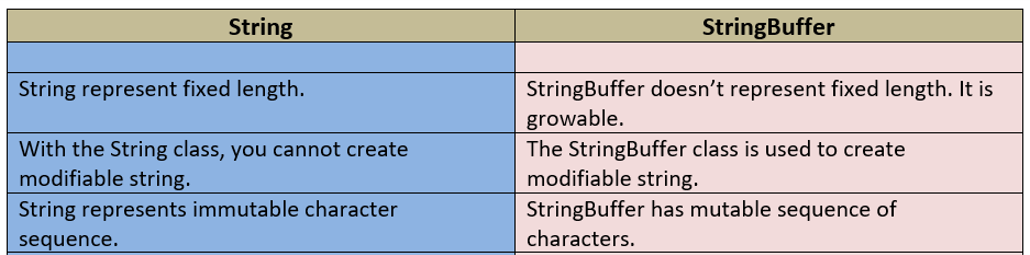
Let us now see an example to understand the difference between a String and a StringBuffer object:
The append() method in Java appends the string representation. Here, we will also understand the difference between a String and a StringBuffer object.
// Append the String representation (StringBuffer)
// Understand the difference between String and StringBuffer object

class Demo69 {
    static void main(String[] args) {

        String s = "ABCDE";
        s = s + "FGHIJ"; // create a new string object
        System.out.println(s);

        StringBuffer sb = new StringBuffer("ABCDE");
        sb.append("FGHIJ"); // modifies the same object
        System.out.println(sb);
    }
}
Output
ABCDEFGHIJ
ABCDEFGHIJ
If you liked the tutorial, spread the word and share the link and our website Studyopedia with others.
For Videos, Join Our YouTube Channel: Join Now
Read More

No Comments