

18 Jan Java Threading
Threading in Java means working on more than two things at the same time. For achieving Threading, Java has the Thread class. The Thread class has constructors and methods to work in Threads in Java.
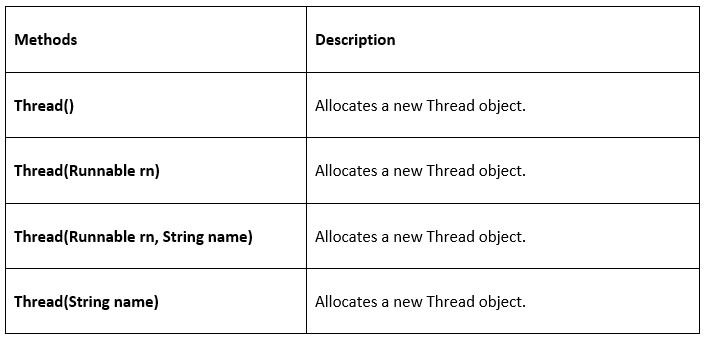
Thread Constructors
The following are the constructors in Java Threading:
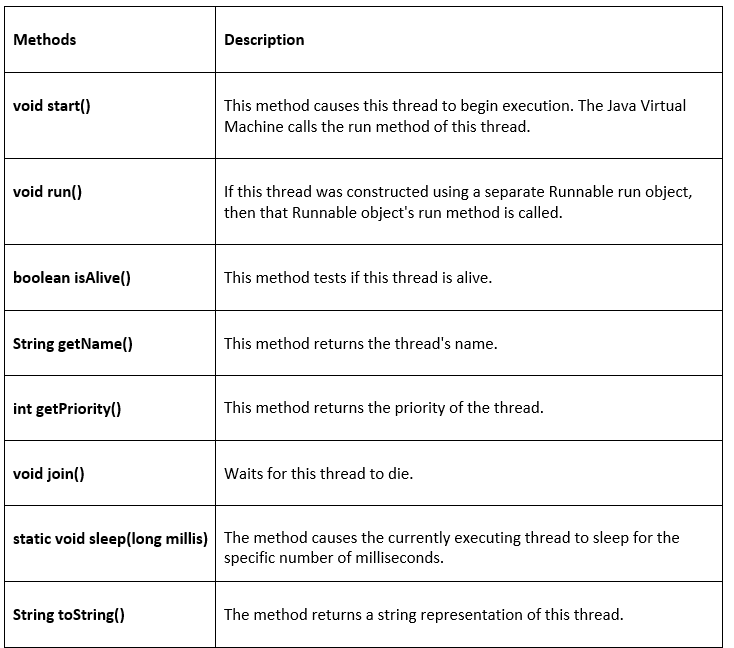
Thread Methods
The following are the methods in Java Threading:
Create a Thread in Java
To create a Thread in Java:
- Create a Thread by extending the Thread class
- Create a Thread by implementing the Runnable interface
Create a Thread by extending the Thread class
We can create a Thread by extending and running the Thread class it using the start() method. Let us see an example:
class Studyopedia extends Thread {

  public void run(){
    System.out.println("The thread is running");
  }
  public static void main(String args[]){
    Studyopedia th = new Studyopedia();

    // The start() method starts the execution of the thread
    th.start();
 }
}
Output
The thread is running
Let us understand the above code:
class Studyopedia extends Thread {→ Defines a classStudyopediathat inherits from Java’s built-inThreadclass.public void run(){→ Overrides therun()method, which contains the code that will execute when the thread runs.System.out.println("The thread is running");→ Prints a message to the console when the thread is active.public static void main(String args[]){→ Entry point of the program; execution starts here.Studyopedia th = new Studyopedia();→ Creates a new thread object namedth.th.start();→ Starts the thread. This internally calls therun()method in a new thread of execution.
Create a Thread by implementing the Runnable interface
We can create a Thread by implementing the Runnable interface and running it using the start() method.
The Runnable interface in Java is a functional interface from the java.lang package that represents a task to be executed by a thread. It defines a single abstract method run(), which contains the code that runs concurrently.
Runnable is generally preferred over extending Thread because:
- Flexibility in inheritance: Java allows only single inheritance. If you extend
Thread, your class cannot extend any other class. By implementingRunnable, your class remains free to extend another class while still defining concurrent behavior. - Separation of concerns: Implementing
Runnablecleanly separates the task (therun()method) from the thread management. TheThreadclass then takes care of execution, while your class focuses only on the logic of the task.
Let us see an example:
// Runnable is preferred because it allows a class to extend another class while still running tasks concurrently.
class Studyopedia implements Runnable{

  public void run(){
    System.out.println("The thread is running");
  }
  public static void main(String args[]){
    Studyopedia s = new Studyopedia();
    Thread th = new Thread(s);

    // The start() method starts the execution of the thread
    th.start();
 }
}
Output
The thread is running
Let us understand the above code:
class Studyopedia implements Runnable {→ Declares a classStudyopediathat implements theRunnableinterface.public void run(){→ Defines the run() method required byRunnable.System.out.println("The thread is running");→ Prints a message when the thread executes.public static void main(String args[]){→ Program execution begins here.Studyopedia s = new Studyopedia();→ Creates anStudyopediaobject, which is aRunnable.Thread th = new Thread(s);→ Creates anThreadobject and passessas the target task.th.start();→ Starts the new thread, which internally calls run().
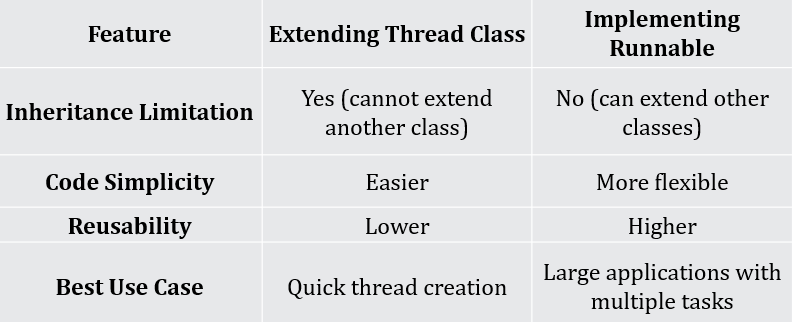
Comparison
Let us compare both the methods we saw above to create threads in Java:
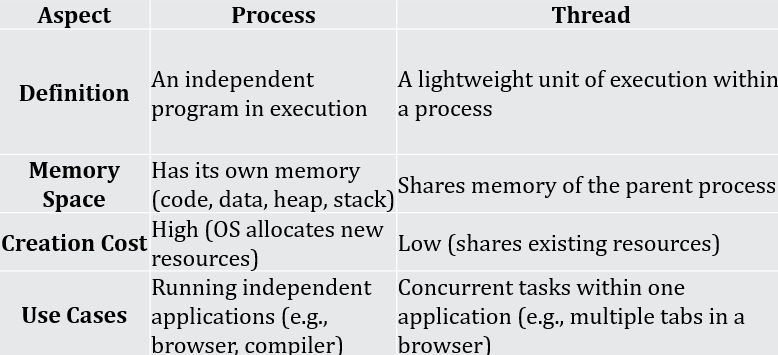
Threads vs Process
If you liked the tutorial, spread the word and share the link and our website Studyopedia with others.
For Videos, Join Our YouTube Channel: Join Now
Read More

No Comments