

24 Jun Java Bitwise Operators
Java Bitwise Operators operate on individual bits of the operands. Let us learn about the type of Bitwise operators in Java. In this lesson, our example will have three variables:
int a = 6;
int b = 7;
int res;
Video Tutorial (English)
Video Tutorial (Hindi)
Bitwise Operators in Java are the following:
- Bitwise NOT,
- Bitwise AND,
- Bitwise OR,
- Bitwise X-OR
- Bitwise Right Shift Operator,
- Bitwise Right Shift Phil Zero Operator,
- Bitwise Left Shift Operator,
- Bitwise AND Assignment,
- Bitwise OR Assignment,
- Bitwise X-OR Assignment,
- Bitwise Right Shift Assignment Operator,
- Bitwise Right Shift Phil Zero Assignment Operator,
- Bitwise Left Shift Assignment Operator
Bitwise NOT
The Bitwise NOT operator inverts all the bits of its operand.
Symbol
~
Example
Let’s say a = 6, then
// Bitwise NOT operator in Java

class Demo17 {
    public static void main(String[] args) {
        int a = 6;
        int res = ~a;

        // The binary corresponds to -7 in decimal (two's complement represenation)
        System.out.println(res);
    }
}
Output
-7
Bitwise AND
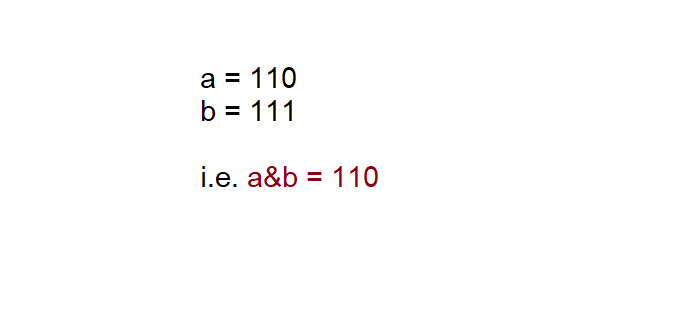
The Bitwise AND operator gives 1, if both the operands are 1.
Symbol
&
Example
// Bitwise AND operator in Java

class Demo18 {
    public static void main(String[] args) {
        int a = 6;
        int b = 7;

        int res = a & b;
        System.out.println(res);
    }
}
Output
6
Showing the above, with bits and the same result is visible,
Bitwise OR
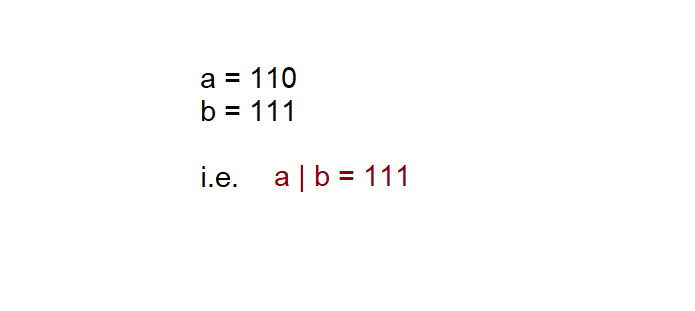
The Bitwise OR operator gives 1, if either of the bit is 1.
Symbol
|
Example
// Bitwise OR operator in Java

class Demo19 {
    public static void main(String[] args) {
        int a = 6;
        int b = 7;

        int res = a | b;
        System.out.println(res);
    }
}
Output
7
Showing the above, with bits and the same result is visible,
Bitwise X-OR
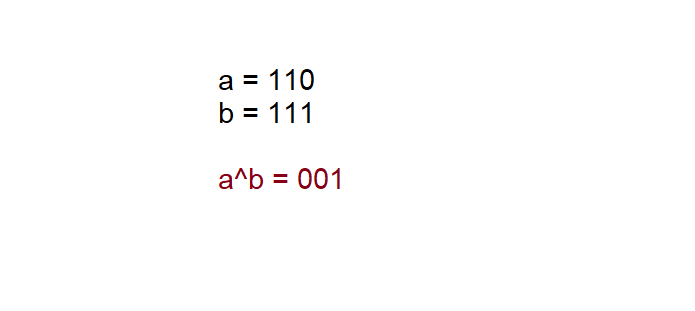
The Bitwise X-OR operator gives 1, if exactly one operand is 1.
Symbol
^
Example
// Bitwise XOR operator in Java

class Demo20 {
    public static void main(String[] args) {
        int a = 6;
        int b = 7;

        int res = a ^ b;
        System.out.println(res);
    }
}
Output
1
Showing the above, with bits and the same result is visible,
Bitwise Right Shift Operator
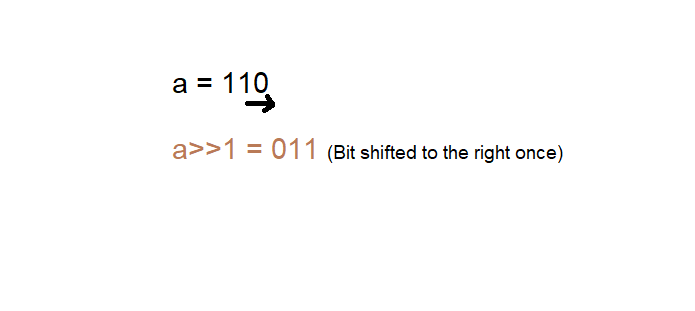
The Bitwise Right Shift operator shifts bit to the right specified number of times.
Symbol
>>
Example
// Bitwise Right Shift Operator

class Demo21 {
    public static void main(String[] args) {
        int a = 6; // 110

        int res = a >> 1; // 011
        System.out.println(res);
    }
}
Output
3
Showing the above, with bits and the same result is visible. It shifts once,
Bitwise Right Shift Phil Zero Operator/ Unsigned Right Shift
The Bitwise Right Shift Zero operator does not preserve sign of original number and fills the new place with zero,
Symbol
>>>
Example
// Bitwise Right Shift Phil Zero Operator

class Demo22 {
    public static void main(String[] args) {
        int a = 6; // 110

        int res = a >>> 2; // 110  // 011 // 001
        System.out.println(res);
    }
}
Output
1
Bitwise Left Shift Operator
The Bitwise Left Shift operator shifts the bits to the left specified number of times in the bit sequence.
Note: Here, we have used 6 in 4-bit binary → 0110. In the previous examples, we used 6 in binary (minimal) → 110. The difference comes from how many bits you choose to display. The value is always the same (6), but the representation changes depending on whether you’re showing 3 bits, 4 bits, or 8 bits.
The 0110 for decimal 6 is a 4-bit representation of 6, padded with a leading zero to fit 4 bits.
Symbol
<<
Example
class Demo23 {
    public static void main(String[] args) {
        int a = 6; // 0110

        int res = a << 1; // 1100 //  8+4+0+0
        System.out.println(res);
    }
}
Output
12
Bitwise AND Assignment
The Bitwise AND Assignment operator performs Bitwise AND and assigns the result to the variable. The Bitwise AND operator gives 1, if both the operands are 1.
Example
// Bitwise AND Assignment

class Demo24 {
    public static void main(String[] args) {
        int a = 6; // 0110
        int b = 7; // 0111

        a &= b; // a = a & b
        System.out.println(a);
    }
}
Output
6
Bitwise OR Assignment
The Bitwise OR Assignment operator performs a Bitwise OR and assigns the result to the variable. The Bitwise OR operator gives 1, if either of the bit is 1.
Example
// Bitwise OR Assignment

class Demo25 {
    public static void main(String[] args) {
        int a = 6; // 0110
        int b = 7; // 0111

        a |= b; // a = a | b
        System.out.println(a);
    }
}
Output
The value of the result is in the variable a. The output is 7,
7
Bitwise X-OR Assignment
The Bitwise X-OR Assignment operator performs Bitwise X-OR and assigns the result to the variable. The Bitwise X-OR operator gives 1, if exactly one operand is 1.
Example
// Bitwise XOR Assignment

class Demo26 {
    public static void main(String[] args) {
        int a = 6; // 0110
        int b = 7; // 0111

        a ^= b; // a = a ^ b
        System.out.println(a); // 0001
    }
}
Output
1
Right Shift Assignment
The Bitwise Right Shift Assignment operator performs Bitwise Right Shift and assigns the result to the variable. The Bitwise Right Shift operator shifts bit to the right specified number of times.
Example
// Bitwise Right Shift Assignment

class Demo27 {
    public static void main(String[] args) {
        int a = 6; // 0110

        a >>= 1; // a = a >> 1
        System.out.println(a); // 0011 // 0+0+2+1
    }
}
Output
The value of the result is in the variable a. The output is 3,
3
Right Shift Phil Zero Assignment
The Bitwise Right Shift Phil Zero Assignment operator performs right shift phil zero and assigns the result to the variable.
The Bitwise Right Shift Zero operator does not preserve sign of original number and fills the new place with zero,
Example
// Bitwise Right Shift Phil Zero Assignment

class Demo28 {
    public static void main(String[] args) {
        int a = 6; // 0110

        a >>>= 2; // a = a >>> 2  // 0011 // 0001
        System.out.println(a); // 0001 // 1
    }
}
Output
The value of the result is in the variable a. It shifts twice.
1
Left Shift Assignment
The Bitwise Left Shift Assignment operator performs Bitwise Left Shift and assigns the result to the variable.
The Bitwise Left Shift operator shifts the bit to the left specified number of times in the bit sequence.
Example
// Bitwise Left Shift Assignment

class Demo29 {
    public static void main(String[] args) {
        int a = 6; // 0110

        a <<= 1; // a = a << 1
        System.out.println(a); // 1100 // 8+4+0+0
    }
}
Output
The value of the result is in the variable a.
12
If you liked the tutorial, spread the word and share the link and our website Studyopedia with others.
For Videos, Join Our YouTube Channel: Join Now
Read More

No Comments