

31 Jan Matplotlib – Plot Titles and Position them
To set the titles in a graph, use the title() method in Matplotlib. Before moving further, we’ve prepared a video tutorial to learn to plot titles and position them in Matplotlib:
Position the title using the loc parameter of the title(). For the left title, use the left parameter value:
plt.title('Left Title', loc='left')
For the right title, use the right parameter value:
plt.title('Right Title', loc='right')
The center title is the default:
plt.title('Center Title')
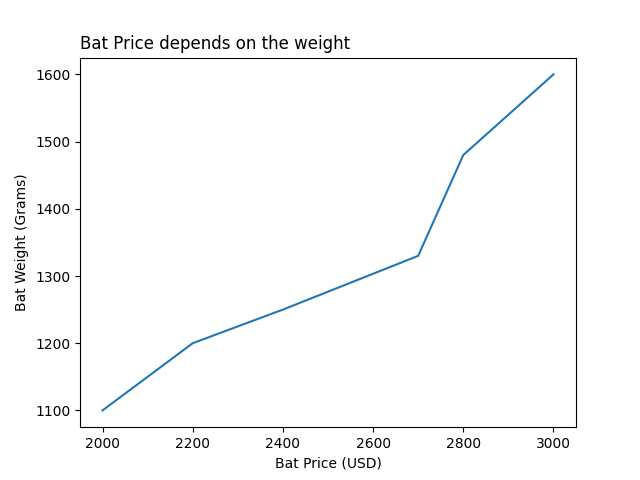
Let us see an example to set a title and its position as well in Matplotlib:
import pandas as pd
import matplotlib.pyplot as plt

# DataFrame with 3 columns
dataFrame = pd.DataFrame(
  {
     "Cricket_Bat": ['SG', 'BDM', 'SS', 'GM', 'Kookaburra', 'Spartan'],
     "MRP": [2000, 2200, 2400, 2700, 2800, 3000],
     "Weight_Grams": [1100, 1200, 1250, 1330, 1480, 1600]
  }
)

# Plot a line graph using the pyplot.plot() method
# The x and y coordinates are the columns of the DataFrame
plt.plot(dataFrame["MRP"], dataFrame["Weight_Grams"])

# The labels for x-coordinate and y-coordinate
plt.xlabel("Bat Price (USD)")
plt.ylabel("Bat Weight (Grams)")

# Set the title on the left
plt.title('Bat Price depends on the weight', loc='left')

# Display the figure
plt.show()
Output
If you liked the tutorial, spread the word and share the link and our website Studyopedia with others.
For Videos, Join Our YouTube Channel: Join Now
Read More:

No Comments