

16 Feb HTML5 abbr Tag
Use the HTML5 abbr tag, to indicate an acronym or abbreviation such as Dr. , NASA, CD, DIY, FMCG, DPI, JPEG, etc. Using acronyms and abbreviation isn’t a bad practice and is known to search engines and browsers.
For providing the full form/ version of the acronym or abbreviation, use the title attribute. On mouse over, the title shows the description.
<!DOCTYPE html>
<html>
<head>
<title>HTML abbr tag</title>
</head>

<body>
<h2>Space Research in US</h2>

<p>The <abbr title="National Aeronautics and Space Administration">NASA</abbr> is an independent agency for aeronautics and aerospace research.</p>

</body>
</html>
Here’s the output,
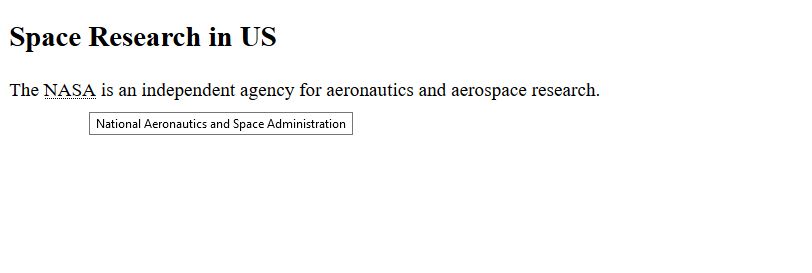
In the above output, as you can see, on keeping mouse cursor the title text is visible. The title displays the full form of NASA.

Rubie
Posted at 19:49h, 22 DecemberHi Studyopedia!
Being a student, i am really very thankful for this website. It really has helped me a lot. But in HTML5, i just cant find the syntax for audio and video tags. I may not be able to find it, but i also hope that u could make finding things more easier ( as the search bar’s not helping a lot ).