

10 Jul HTML5 mark Tag
If you want to highlight a text, then use the HTML5 <mark> tag. The highlighted text will allow readers to understand the relevance of the highlighted word/words in a particular context.
Always remember, do not use the <mark> tag for syntax highlighting. Also, the <mark> tag isn’t the <b> or <strong> tag.
Example
<!DOCTYPE html>
<html>
<head>
<title>Understanding HTML5 Mark tag</title>
</head>
<body>
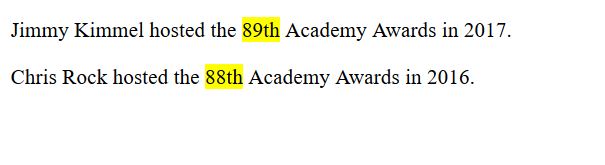
<p> Jimmy Kimmel hosted the <mark>89th</mark> Academy Awards in 2017.</p>
<p> Chris Rock hosted the <mark>88th</mark> Academy Awards in 2016.</p>
</body>
</html>
Here’s the output, which shows the words highlighted using the HTML5 <mark> element,

No Comments