

07 Oct Bootstrap Forms
In this lesson, learn how to create a form in Bootstrap. We will create a full-width and inline form in Bootstrap with examples:
- Create a Full-width form with the .form-group class
- Create an Inline Form with the .form-inline class
Example – Bootstrap Forms
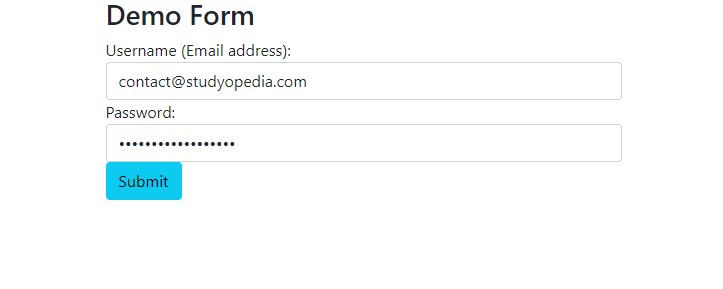
Let us now see an example to create Forms in Bootstrap:
<!DOCTYPE html>
<html lang="en">
   <head>
      <title>Bootstrap Forms Example</title>
      <meta charset="utf-8">
      <meta name="viewport" content="width=device-width, initial-scale=1">
      <link href="https://cdn.jsdelivr.net/npm/bootstrap@5.1.3/dist/css/bootstrap.min.css" rel="stylesheet">
      <script src="https://cdn.jsdelivr.net/npm/bootstrap@5.1.3/dist/js/bootstrap.bundle.min.js"></script>
   </head>
   <body>
      <div class="container">
         <h2>Demo Form</h2>
         <form action="new.php">
            <div class="form-group">
               <label for="email">Username (Email address):</label>
               <input type="email" class="form-control" id="email">
            </div>
            <div class="form-group">
               <label for="pwd">Password:</label>
               <input type="password" class="form-control" id="pwd">
            </div>
            <button type="submit" class="btn btn-info">Submit</button>
         </form>
      </div>
   </body>
</html>
Output
Video Tutorial – Bootstrap Forms
The following is the complete video tutorial to learn how to work with Forms in Bootstrap:
If you liked the tutorial, spread the word and share the link and our website Studyopedia with others.
Read More:

No Comments