

06 Aug JavaScript Strict Mode
Strict mode in JavaScript is the use of strict mode. It is defined as the following in the JavaScript code:
"use strict";
The use of strict mode prevents the accidental creation of global variables. If you assign a value to an undeclared variable, JavaScript will throw a ReferenceError instead of creating it globally:
"use strict";
a = 5; // Throws an error because 'a' is not declared
Enforces stricter coding rules, helping developers catch errors early, write safer code, and avoid problematic practices. It improves debugging, prevents silent failures, and ensures better compatibility with future JavaScript versions.
It disallows duplicate parameter names, reducing ambiguity:
"use strict";
function sum(smarks, smarks, pmarks) {
    // Error is thorwn in strict mode
    return smarks + smarks + pmarks;
}
Not Allowed: Using an undeclared variable
The code executed in strict mode can never have undeclared variables. Let us see an example:
<!DOCTYPE html>
<html>
<body>

<h1>Demo Heading</h1>
<p>This is the strict mode.</p>

<p>Press (F12) and check the error.</p>

<script>
"use strict"; // the strict mode

// using a variable without declaring
a = 5
</script>

</body>
</html>
Output
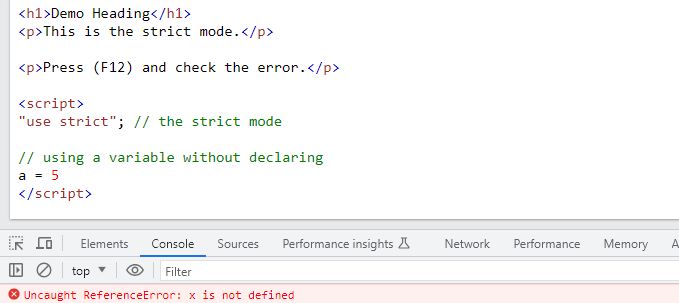
On pressing F12, the exact error is visible because we have used the strict mode and used a variable without declaring:
Not Allowed: Deleting a variable
If your JavaScript code is in strict mode, then you cannot delete the variable. Let us see an example:
<!DOCTYPE html>
<html>
<body>

<h1>Demo Heading</h1>
<p>This is the strict mode.</p>

<p>Press (F12) and check the error.</p>

<script>
"use strict"; // the strict mode

let a = 5

// trying to delete a variable
delete a;
</script>

</body>
</html>
Output
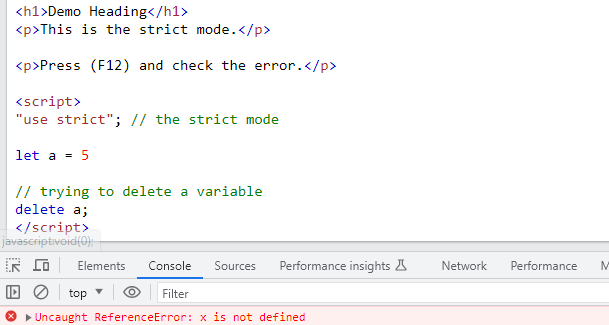
On pressing F12, the exact error is visible because we have used the strict mode and deleted a variable:

No Comments