

20 Feb JavaScript – Decision Making Statements
With decision-making statements in JavaScript, easily make decisions based on different conditions. The following are the decision-making statements in JavaScript:
- if statement
- if…else statement
- if…elseif..else statement
- switch statement
if statement
The if statement in JavaScript executes the code if the condition is true. The following is the syntax of the if statement:
if (condition) {
   // statement(s) gets executed if the condition is True
}
Let us see an example to implement the if statement in JavaScript:
<!DOCTYPE html>
<html>
<body>

<h1>if statement</h1>
<h2>Vote Status</h2>

<p id="test"></p>

<script>
let age = 20

// Check the vote eligibility
if (age > 18) {
  document.getElementById("test").innerHTML = "The Candidate is Eligible to Vote";
}
</script>

</body>
</html>
Output

if…else statement
The if…else statement in JavaScript executes some code if the condition is true and another code if
the condition is false. The false condition comes under else. The following is the syntax of the if…else statement:
if (condition) {
   // code will execute if the condition is true
}
else {
   // code will execute if the condition is false
}
Let us see an example to implement the if…else statement in JavaScript:
<!DOCTYPE html>
<html>
<body>

<h1>if...else statement</h1>
<h2>Vote Status</h2>

<p id="test"></p>

<script>
let age = 15

// Check the vote eligibility
if (age > 18) {
 result = "The Candidate is Eligible to Vote"
}
else {
 result = "The Candidate is not Eligible to Vote"
}

 document.getElementById("test").innerHTML = result;
</script>
</body>
</html>
Output

if…else if…else statement
The if…else if…else statement in JavaScript executes code for different conditions. If more than 2 conditions are true, you can use else for the false condition.
The following is the syntax of the if…else if…else statement:
if (condition1) {
   // code will execute if the condition is true
} else if (condition2) {
   // code will execute if condition2 is true
} else if (condition3) {
   // code will execute if condition3 true
} else {
   // code will execute if all the above given conditions are false
}
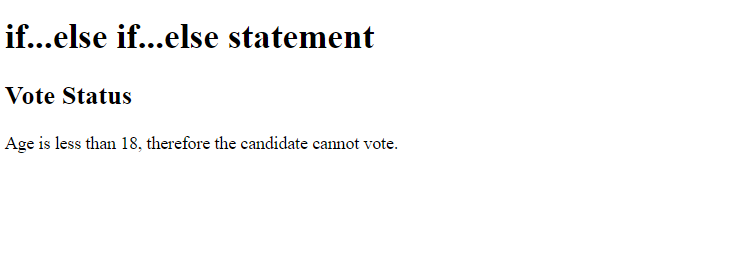
Let us see an example to implement the if…else if…else statement in JavaScript:
<!DOCTYPE html>
<html>
<body>

<h1>if...else if...else statement</h1>
<h2>Vote Status</h2>

<p id="test"></p>

<script>
let age = 15

// Check the vote eligibility
if (age > 18) {
 result = "The Candidate is Eligible to Vote"
}
else if (age == 18){
 result = "Age is 18, therefore the candidate can vote."
}
else {
  result = "Age is less than 18, therefore the candidate cannot vote."
}

 document.getElementById("test").innerHTML = result;
</script>

</body>
</html>
Output
Switch statement in JavaScript
The switch statement evaluates an expression and matches its result against a series of case clauses. It is often used as a cleaner, more readable alternative to long if…else if chains when you are checking for exact matches of a single value.
Here is the syntax:
switch (expression) {
  case value1:
    // Code to execute if expression === value1
    break;
  case value2:
    // Code to execute if expression === value2
    break;
  default:
    // Code to execute if no cases match
}
Let us see an example to implement the switch statement in JavaScript:
<!-- Decision-Making Statements in JavaScript -->
<!-- Switch statement -->
<!DOCTYPE html>
<html>
<head>
   <title>Switch Statement</title>
</head>
<body>
<h1>Switch statement</h1>
<h2>Grades</h2>

<p id = "demo"></p>
<script>
let score = 85;

switch(true) {

    case(score >= 90):
      document.getElementById("demo").innerHTML = "Grade A";
      break;
    case(score >= 80):
      document.getElementById("demo").innerHTML = "Grade B";
      break;
    case(score >= 70):
      document.getElementById("demo").innerHTML = "Grade C";
      break;
    default:
     document.getElementById("demo").innerHTML = "Grade F";
}
</script>
</body>
</html>
Output

Use switch(true) in JavaScript to evaluate ranges. This pattern works because a switch statement looks for a case that strictly matches the value provided in the parentheses. By passingtrue, you tell JavaScript to execute the first case that evaluates to a true Boolean result.

No Comments