

06 Aug JavaScript – Hoisting
In JavaScript, you can use a variable even before declaring it. By default, JavaScript moves all the declarations to the top, i.e., hoisting. The declarations are moved to the current scope’s top.
Hoisting is a behavior in JavaScript where variable and function declarations are processed before any code is executed. Conceptually, they are “lifted” to the top of their scope (global or function).
In JavaScript, hoisting is the interpreter’s behavior of moving the declarations of variables, functions, and classes to the top of their scope before the code executes. While it appears that code is physically moved, the engine actually scans the code during a “creation phase” to set up memory space for these identifiers.
Hoisting is JavaScript’s behavior of moving variable and function declarations to the top of their scope (before code execution).
- Declarations are hoisted.
- Initializations/assignments are not hoisted.
Best Practices to Avoid Hoisting Bugs
- Use const and let: Modern standards recommend avoiding var to prevent the unpredictable behavior of accessing variables before they are initialized.
- Declare at the top: Manually declaring all variables and functions at the beginning of their scope makes the code’s execution flow clearer.
The var for variable declaration
With var, you can use a variable even before declaring it. Let us see an example. We have used the var keyword for variable declaration:
<!DOCTYPE html>
<html>
<body>

<h1>Demo Heading</h1>

<p>Press (F12) and check the error.</p>

<script>
// using a variable without declaring
a = 5
var a
</script>

</body>
</html>
Output
The above works for the var, but won’t work for let and const keywords.
The let for variable declaration
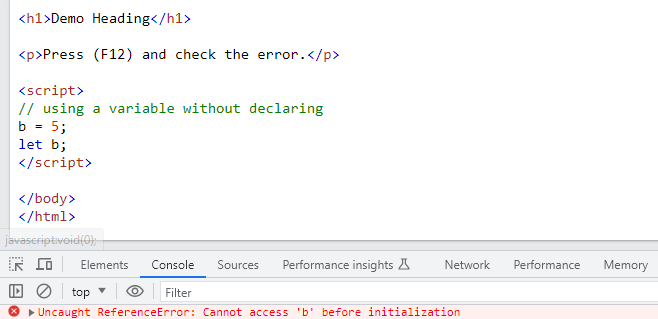
Unlike var, you cannot use a let variable before declaring it. If you use it, a ReferenceError will be thrown. Let us see an example:
<!DOCTYPE html>
<html>
<body>

<h1>Demo Heading</h1>

<p>Press (F12) and check the error.</p>

<script>
// using a variable without declaring
b = 5;
let b;
</script>

</body>
</html>
Output
ReferenceError can be seen:
The const for variable declaration
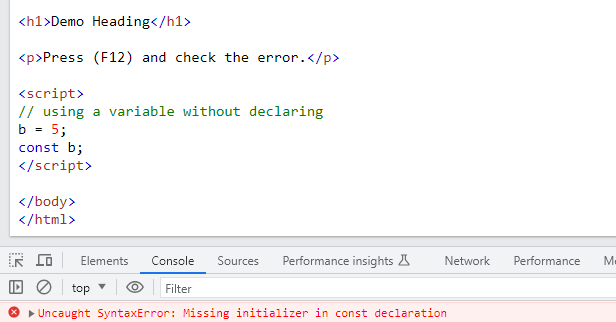
Unlike var, you cannot use a const variable before declaring it. If you use it, SyntaxError will be thrown. Let us see an example:
<!DOCTYPE html>
<html>
<body>

<h1>Demo Heading</h1>

<p>Press (F12) and check the error.</p>

<script>
// using a variable without declaring
b = 5;
const b;
</script>

</body>
</html>
Output
SyntaxError can be seen:

No Comments