

03 Mar How to download a dataset on Hugging Face
Downloading datasets from Hugging Face is straightforward using the Datasets library. Below is a step-by-step guide to help you download and use datasets from the Hugging Face Hub.
Step 1: Install the Datasets Library
If you haven’t already installed the datasets library, you can do so using pip. On Google Colab, use the following command to install:
!pip install datasets
Step 2: Load a Dataset
You can load a dataset using the load_dataset function. This function can download datasets from the Hugging Face Hub or load them from local files.
Download a Dataset from the Hugging Face Hub
To download a dataset from the Hugging Face Hub, simply specify the dataset name. For example, to load the IMDB dataset:
from datasets import load_dataset

# Load the IMDB dataset
dataset = load_dataset("imdb")

# Explore the dataset
print(dataset)
The above code downloads a popular dataset for sentiment analysis tasks, often used for training and evaluating machine learning models. Here’s what happens:
- Importing
load_dataset: Theload_datasetfunction is part of thedatasetslibrary, which provides access to various public datasets like IMDB, SQuAD, and more. - Loading the IMDB dataset: The IMDB dataset contains movie reviews labeled as “positive” or “negative” for sentiment classification. When you run
load_dataset("imdb"), it automatically downloads and processes the dataset. - Printing the dataset: Executing
print(dataset)will display an overview of the dataset, including:- The dataset splits (e.g.,
train,test). - The number of samples in each split.
- Example data fields (e.g.,
textfor reviews andlabelfor sentiment).
- The dataset splits (e.g.,
Output
DatasetDict({
    train: Dataset({
        features: ['text', 'label'],
        num_rows: 25000
    })
    test: Dataset({
        features: ['text', 'label'],
        num_rows: 25000
    })
    unsupervised: Dataset({
        features: ['text', 'label'],
        num_rows: 50000
    })
})
Your output shows the structure of the IMDB dataset as a DatasetDict, which organizes the dataset into different splits. Here’s a quick breakdown of what you’re seeing:
- train: Contains 25,000 rows with features
text(movie reviews) andlabel(sentiment, e.g., positive or negative). - test: Similarly has 25,000 rows for testing purposes, with the same features.
- unsupervised: Contains 50,000 rows, but this split typically doesn’t have labels for sentiment analysis. It’s often used for tasks like pretraining or semi-supervised learning.
Load a Specific Split
You can load a specific split of the dataset (e.g., train, test, or validation):
train_dataset = dataset["train"]
test_dataset = dataset["test"]
Access Dataset Samples
You can access individual samples or slices of the dataset:
# Access the first example in the training set
print(train_dataset[0])

# Access the first 5 examples
print(train_dataset[:5])
Step 3: Download a Dataset with Custom Configurations
Some datasets have multiple configurations or subsets. You can specify the configuration using the name parameter.
For example, the Wikipedia dataset has configurations for different languages:
# Load the English Wikipedia dataset
wiki_dataset = load_dataset("wikipedia", "20220301.en")

# Explore the dataset
print(wiki_dataset)
Step 4: Download a Dataset from a Local File
If you have a dataset stored locally (e.g., in CSV, JSON, or text format), you can load it using the load_dataset function.
Load a CSV File
# Load a dataset from a local CSV file
local_dataset = load_dataset("csv", data_files="path/to/file.csv")

# Explore the dataset
print(local_dataset)
Load Multiple Files
You can load multiple files by passing a list of file paths:
# Load multiple CSV files
local_dataset = load_dataset("csv", data_files=["file1.csv", "file2.csv"])
Step 5: Stream Large Datasets
For very large datasets, you can use streaming mode to avoid loading the entire dataset into memory:
# Load the dataset in streaming mode
streamed_dataset = load_dataset("imdb", streaming=True)

# Iterate over the dataset
for example in streamed_dataset["train"]:
    print(example)
    break  # Stop after the first example
Step 6: Download a Dataset from the Hugging Face Hub Website
If you prefer to download datasets manually, you can do so from the Hugging Face Hub website:
- Go to the Hugging Face Hub: https://huggingface.co/datasets.
- Search for the dataset you want (e.g., imdb).
- Click on the dataset to open its page.
- Download the dataset files directly from the “Files” tab.
Step 7: Use the Downloaded Dataset
Once the dataset is downloaded, you can use it for training, evaluation, or analysis. Here’s an example of using the IMDB dataset for sentiment analysis:
from datasets import load_dataset
from transformers import AutoTokenizer

# Load the dataset
dataset = load_dataset("imdb")

# Load a tokenizer
tokenizer = AutoTokenizer.from_pretrained("bert-base-uncased")

# Tokenize the dataset
def tokenize_function(examples):
    return tokenizer(examples["text"], padding="max_length", truncation=True)

tokenized_dataset = dataset.map(tokenize_function, batched=True)

# Explore the tokenized dataset
print(tokenized_dataset["train"][0])
Step 8: Save a Dataset Locally
If you want to save a dataset locally for offline use, you can do so using the save_to_disk() method:
# Save the dataset to a local directory
tokenized_dataset.save_to_disk("path/to/save/dataset")
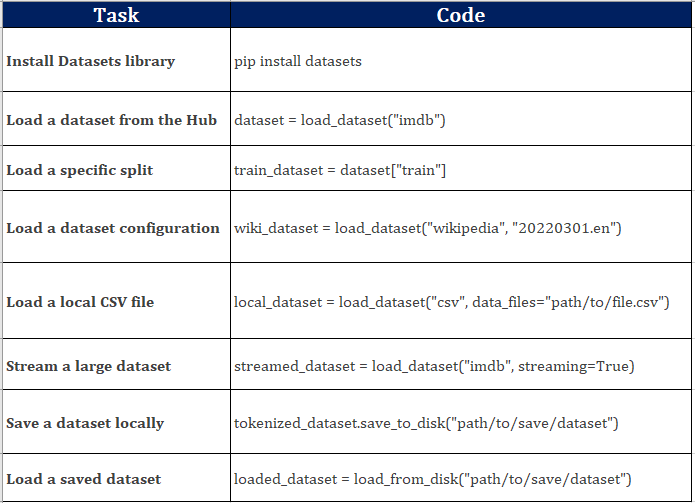
We used the following commands above:
If you liked the tutorial, spread the word and share the link and our website Studyopedia with others.
For Videos, Join Our YouTube Channel: Join Now
Read More:
- RAG Tutorial
- Generative AI Tutorial
- Machine Learning Tutorial
- Deep Learning Tutorial
- Ollama Tutorial
- Retrieval Augmented Generation (RAG) Tutorial
- Copilot Tutorial
- ChatGPT Tutorial

No Comments