

14 Feb R Matrices
A matrix is an arrangement of data in two-dimensional form. It has rows and columns. In this lesson, we will learn how to create a Matrix and work on some operations on R Matrices:
- Representation of a Matrix
- Create a Matrix
- Iterate a Matrix
- Get the Matrix length
- Access Matrix Items
- Find the number of rows and columns in a Matrix
Representation of a Matrix
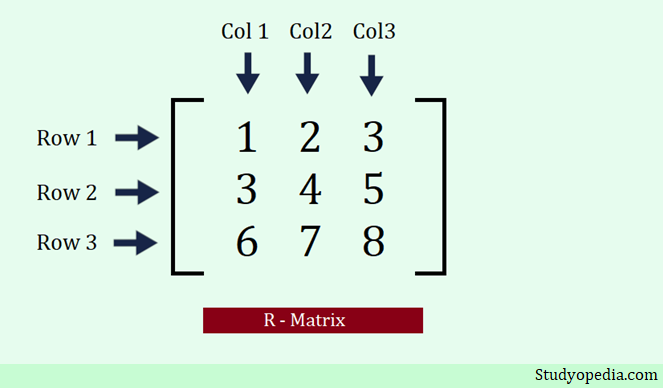
To begin with, in the below figure, we have shown the representation of a matrix in the form of rows and columns. A row has a horizontal form whereas columns have a vertical form. It is a 3×3 matrix i.e. 3 rows and 3 columns:
Create a Matrix
To create a matrix in the R programming language, use the matrix() method. Using the nrow and ncol parameters, you need to set the number of rows and columns. In the below example, we have created a matrix. The c() is used to merge and concatenate the elements.
Let us see an example to create a matrix in the R programming language:
# Create a matrix with 3 rows and 3 columns i.e. 9 elements
# The nrow parameter sets the rows
# The ncol parameter sets the columns
myMatrix <- matrix(c(10, 15, 20, 25, 30, 35, 40, 45, 50), nrow = 3, ncol = 3)

# Display
myMatrix
Output
     [,1] [,2] [,3]
[1,]   10   25   40
[2,]   15   30   45
[3,]   20   35   50
Iterate a Matrix
To iterate a matrix in the R programming language, use the for loop. Let us see an example:
# Create a matrix with 3 rows and 3 columns i.e. 9 elements
# The nrow parameter sets the rows
# The ncol parameter sets the columns
myMatrix <- matrix(c(10, 15, 20, 25, 30, 35, 40, 45, 50), nrow = 3, ncol = 3)

# Display the matrix
myMatrix

# Iterate and loop through
for (rows in 1:nrow(myMatrix)) {
  for (columns in 1:ncol(myMatrix)) {
    # Iterate and display the matrix
    print(myMatrix[rows, columns])
  }
}
Output
     [,1] [,2] [,3]
[1,]   10   25   40
[2,]   15   30   45
[3,]   20   35   50
[1] 10
[1] 25
[1] 40
[1] 15
[1] 30
[1] 45
[1] 20
[1] 35
[1] 50
Matrix Length
The length() function is used to in the R programming language to get the matrix length. Let us see an example:
# Create a matrix with 3 rows and 3 columns i.e. 9 elements
# The nrow parameter sets the rows
# The ncol parameter sets the columns
myMatrix <- matrix(c(10, 15, 20, 25, 30, 35, 40, 45, 50), nrow = 3, ncol = 3)

# Display the matrix
myMatrix

# Iterate and loop through
length(myMatrix)
Output
     [,1] [,2] [,3]
[1,]   10   25   40
[2,]   15   30   45
[3,]   20   35   50
[1] 9
Access Matrix Items
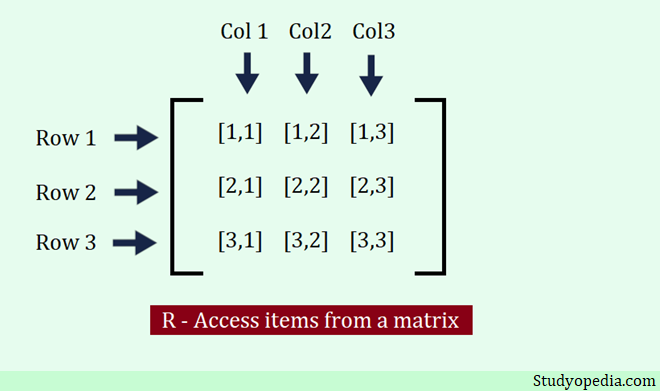
Use the [ ] brackets in R to access the list items i.e. elements of a List. Two values need to be set as a parameter. The 1st is the row position and the 2nd position is a column. Just set the position numbers of the rows and columns for the element you want to fetch as in the below figure:
Let us see an example to access items from a matrix. We have access to all the items of a matrix to make the concept clear:
# Create a matrix with 3 rows and 3 columns i.e. 9 elements
# The nrow parameter sets the rows
# The ncol parameter sets the columns
myMatrix <- matrix(c(10, 15, 20, 25, 30, 35, 40, 45, 50), nrow = 3, ncol = 3)

# Display the matrix
myMatrix

# Access items from a matrix
myMatrix[1, 1] # 1st row 1st column
myMatrix[1, 2] # 1st row 2nd column
myMatrix[1, 3] # 1st row 3rd column

myMatrix[2, 1] # 2nd row 1st column
myMatrix[2, 2] # 2nd row 2nd column
myMatrix[2, 3] # 2nd row 3rd column

myMatrix[3, 1] # 3rd row 1st column
myMatrix[3, 2] # 3rd row 2nd column
myMatrix[3, 3] # 3rd row 3rd column
Output
     [,1] [,2] [,3]
[1,]   10   25   40
[2,]   15   30   45
[3,]   20   35   50
[1] 10
[1] 25
[1] 40
[1] 15
[1] 30
[1] 45
[1] 20
[1] 35
[1] 50
Find the number of rows and columns in a Matrix
The dim() function is used in the R programming language to find the number of rows and columns in a matrix. In the below example, we have a 3×3 matrix i.e. a matrix with 3 rows and 3 columns.
Let us see the example to find the count of rows and columns in an R matrix:
# Create a matrix with 3 rows and 3 columns i.e. 9 elements
# The nrow parameter sets the rows
# The ncol parameter sets the columns
myMatrix <- matrix(c(10, 15, 20, 25, 30, 35, 40, 45, 50), nrow = 3, ncol = 3)

# Display the matrix
myMatrix

# Find the number of rows and columns in a Matrix
dim(myMatrix)
Output
     [,1] [,2] [,3]
[1,]   10   25   40
[2,]   15   30   45
[3,]   20   35   50
[1] 3 3
If you liked the tutorial, spread the word and share the link and our website Studyopedia with others.
For Videos, Join Our YouTube Channel: Join Now
Read More:

No Comments