

08 Jan What are Workflow Triggers in n8n
Every n8n workflow needs a starting point, or a trigger node. Start workflows automatically based on events or schedules. Here are some types:
- Schedule Trigger: This time-based trigger runs your workflow at fixed intervals (e.g., every hour, daily at 9 AM). It’s perfect for tasks like periodic data fetching or report generation.
- Webhook Trigger: This event-based trigger starts a workflow when it receives an HTTP request (a “webhook”) from an external app or service. Unlike constantly checking for updates (polling), a webhook waits to be notified, making it efficient for real-time reactions like processing a form submission or a new Discord message.
Here are all the trigger types you’ll use in n8n:
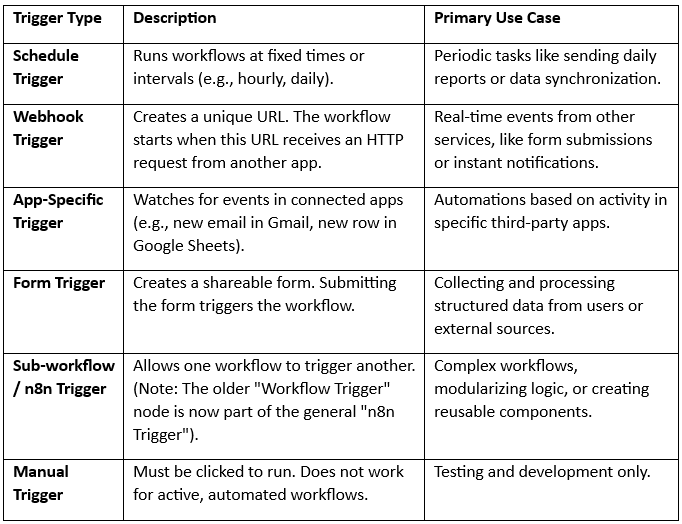
For a visual overview of how triggers connect to actions in a typical n8n workflow, you can see this simplified workflow pattern.
Key Design Considerations
- Using Multiple Triggers in One Workflow: You can add several trigger nodes (e.g., a Webhook and a Form) to a single workflow. However, n8n treats them as alternatives; only the one that receives the event will execute. If your next steps depend on knowing which trigger fired, you’ll need logic, like a Switch node, to check the incoming data’s structure.
- One Workflow vs. Many: While you can centralize logic for similar tasks (like processing different products) into one large workflow, consider separating them if they become complex, memory-intensive, or hard to debug. Separate workflows are often easier to manage and troubleshoot.
Getting Started Tips
- Choose the Right Trigger: Match the trigger to your event source (use Schedule for time-based, Webhook for external apps).
- Start Simple: Use a Manual Trigger to build and test your workflow logic, then replace it with an automated trigger (like Schedule or Webhook) for production.
- Activate Your Workflow: Remember, any trigger except “Manual” will only work if you toggle the workflow to Active in the n8n editor.
In summary, triggers are the “when” of your automation, from scheduled times to real-time web requests.
If you liked the tutorial, spread the word and share the link and our website, Studyopedia, with others.
For Videos, Join Our YouTube Channel: Join Now
Read More:
- What is Deep Learning
- Feedforward Neural Networks (FNN)
- Convolutional Neural Network (CNN)
- Recurrent Neural Networks (RNN)
- Long short-term memory (LSTM)
- Generative Adversarial Networks (GANs)

No Comments